Pay Yourself Back with your Chase Points
Last night, I was at dinner with a friend who has the Chase Preferred Sapphire card. We were talking about how she dreads redeeming her Chase points because she feels like she never gets the best redemption. She isn’t a self proclaimed “points hacker”, but tends to use her points for flights. She told me that she logged onto the Chase Travel Portal to redeem her points, and found the flight she needed was more expensive than through the airline. She was bummed, but in an effort to save money, she booked it anyway.
I asked her over dinner, why didn’t you pay yourself back? She didn’t understand what I was saying. Let me explain:
Chase is one of the only travel credit cards that has a 1:1 “pay yourself back” or cash rewards on ANY category. Capital One offers a 1:1 “pay yourself back” only on travel. When I say 1:1, I mean that 100 points = $1. So with the Chase and Capital One card, you are redeeming points at a pretty high value for cash. However, Amex and Capital One give you pennies on the dollar for cash back. This is just cash money towards your credit card statement and can be redeemed at any time. I’ll explain more below about the differences.
Chase points can be broken down to 100 points = $1. This now includes points on the Chase portal as well (previously it was a 1.25x redemption). So whether you book on the Chase portal, or “pay yourself back,” points are worth the same amount.
Pay Yourself Back
There is a slight difference between “pay yourself back” and cash rewards. Essentially, they do the same thing but are a little different to redeem. Pay Yourself Back means you have to select the individual transactions that you want to redeem your points for. On the Chase app, it’s easy enough to pay yourself back on any category, so you can just keep checking expenses until it reaches the amount of points you want to redeem.
For Capital One cards, you can pay yourself back in a similar way, but only the travel category. Although, since it’s given as just a statement credit, you can “pay yourself back” for travel, and just use those funds towards other credit card purchases.
This is what the “pay yourself back” looks like on the Chase app. To find it, go to your Sapphire card and click “Benefits & Rewards” —> “Redeem Rewards” —> “Pay Yourself Back”
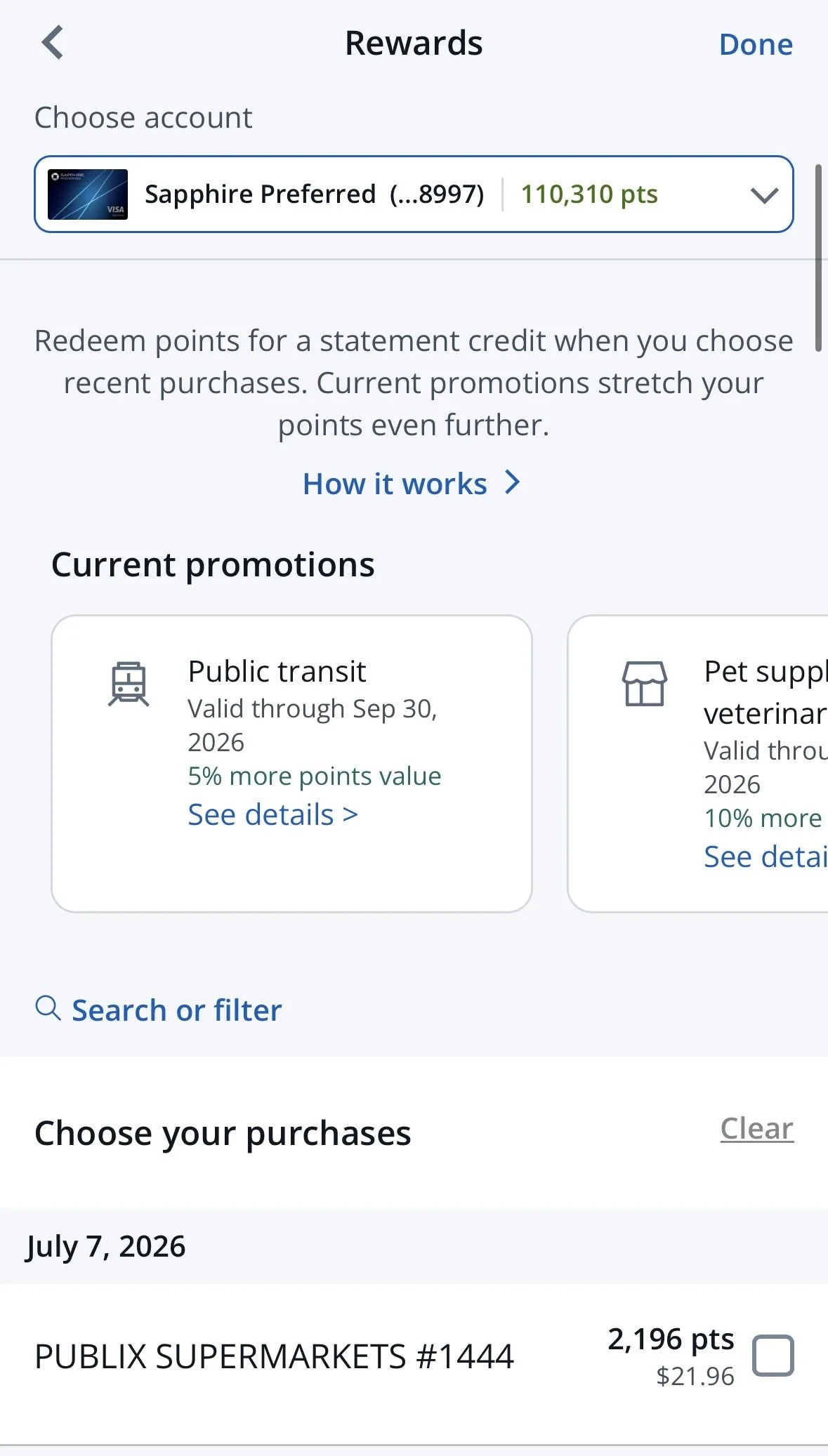
You can Pay Yourself Back with points for each individual transaction you’ve had, going back months. It arrives as a statement credit within a few days.
2. Cash Rewards
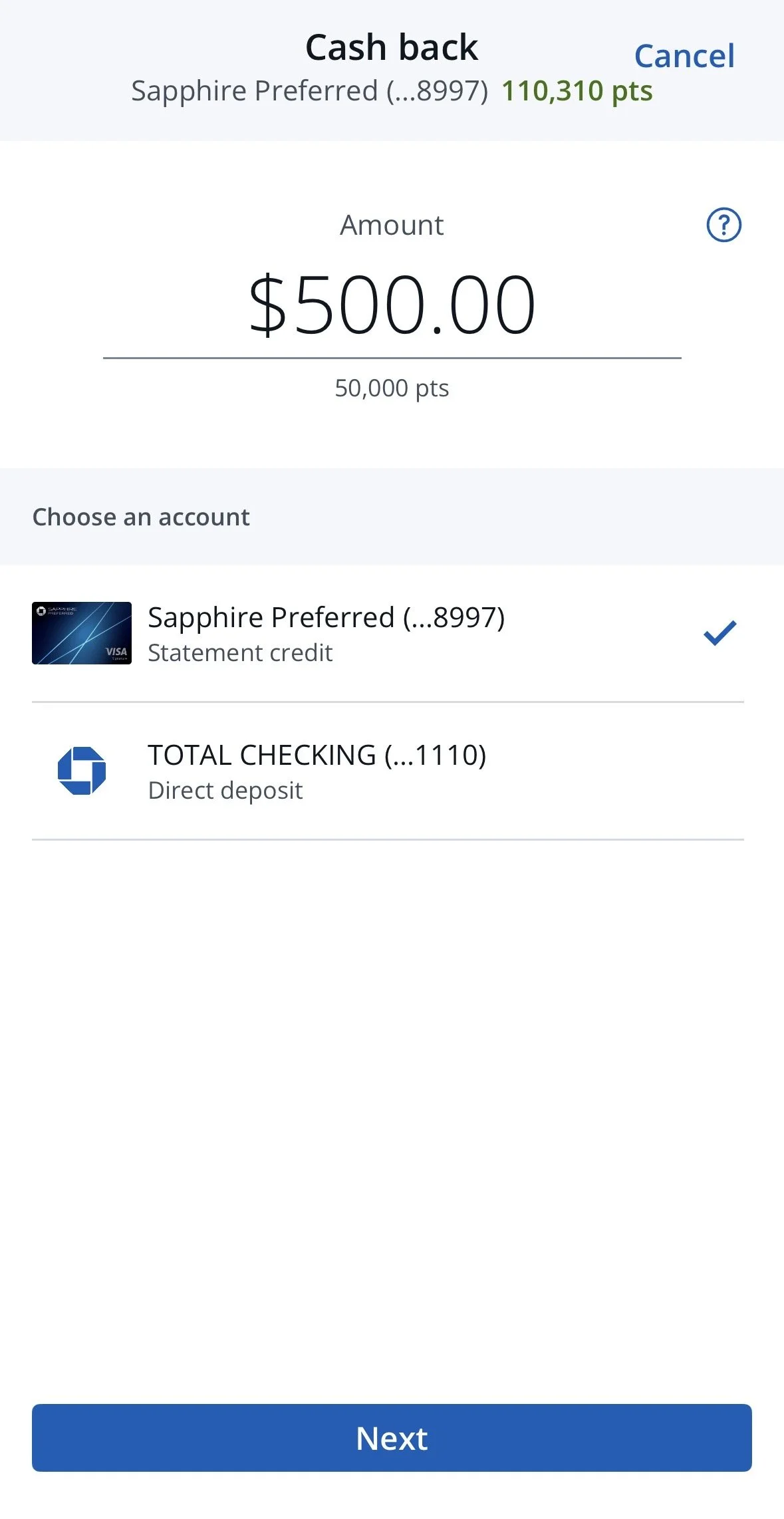
This is a much faster and easier way to pay yourself back in a lump sum. I only recommend this with Chase cards, as Amex and Capital One do not offer 1:1 points to cash redemptions. As you can see below, if I wanted to redeem 50,000 that could be used as a $500 statement credit on my next credit bill. This one is much easier to find on the app, and all you have to do is go to your Sapphire card and click “Benefits & Rewards” —> “Cash Back.”
Cash Rewards
How I would redeem 50,000 Chase Points for $500. If you have a Chase Checking Account, you could even deposit the points into your checking account. This is one of the reasons I love the Chase Card. They have great travel partners, but also great cash back benefits.
Why it matters
Luckily with Chase, if you book through their Travel Portal, you get the airline reward miles. However, that’s not the case with all credit card travel portals. The other day I booked a flight with my Capital One Venture X points through the Capital One travel portal, which I rarely do. After I took the trip, I realized I never received my Delta Skymiles for the flight. I did a quick search and realized that if you book through the Capital One Travel Portal, they use Skyscanner for their flights. Therefore, these flights are considered booked through a third party and you won’t receive the airline miles.
Don’t make the same mistake I did. Here’s what you should do instead to maximize your points redemption and status on the airline:
Book the flight with your Capital One Venture X card directly with the airline
Once the charge hits your card, go to the “Rewards” section when you log into the app or website
Hit “Cover travel purchases” and check the box for the flight you just booked
Use as many miles as you want toward the flight, which will be shown on your credit card statement within a few days
Now you’ve used your points, made the flight cheaper, AND earned airlines miles to redeem for future flights and contribute towards status.
Another friend of mine wanted to take a last minute trip to luxury resort in Hawaii. They didn’t want to stay at a chain hotel or book through the Chase portal for the trip. They felt like they were wasting the 200,000 Chase points that had been sitting on their card for some time. After some convincing, I told them to pay themselves back with the points after they book the trip. Yes, you could wait for the perfect time to redeem these points and maximize them. Or, you could take $2,000 off your vacation, and not break the bank. I’m not saying one strategy is better than the other. The best strategy is what works for YOU.
The Chase Sapphire Preferred is not only a great travel credit card to earn more points quickly (with included travel protection!) but it also gives you the flexibility to redeem points the way that works best for you. If you are interested in learning more about the Chase Sapphire cards, you can learn more here.
